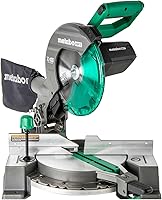
Is a Miter Saw Laser Guide Worth Having?
A miter saw laser guide helps you align stock quickly, especially for repeated cuts. Choose a guide you can see clearly, confirm its position with a test cut, and keep measuring because the beam does not account for blade width or set the cut angle.
On this page (9 sections)
- What does a miter saw laser guide do?
- How does a laser compare with an LED cutline?
- When is a miter saw laser guide useful?
- When can you skip a miter saw laser guide?
- How do you set up a miter saw laser guide?
- Can you add a laser attachment to a miter saw?
- What mistakes should you avoid with a miter saw laser guide?
- Which miter saw laser guide should you choose?
- Is a miter saw laser guide worth it for your work?
A miter saw laser guide can speed up repeated cuts by helping you line up the workpiece, but it does not guarantee accuracy. Check the beam against a test cut, account for the blade's kerf, and keep measuring.
A laser makes the expected cut area easier to see while you position a board. It won't choose the correct angle or make an unstable workpiece safe.
What does a miter saw laser guide do?
A miter saw laser guide projects a visible line near the blade's path to help position a workpiece before cutting. Depending on the saw, the line may show one edge of the blade path or its center.
The beam is a reference, not the cut itself. Blade width removes material, so placing the beam directly on a pencil line may leave the cut on the wrong side of your mark.
Before using it on project material, place scrap against the fence and check where the beam falls. Make a test cut, then compare the cut edge with your pencil mark to see which side of the line the blade removes.
A guide is most useful when you make many similar cuts, such as trim pieces or framing parts. For an occasional cut, a clear mark, careful setup, and a test piece may be enough.
How does a laser compare with an LED cutline?
A laser projects a line onto the workpiece, while an LED cutline system uses light to show the blade's shadow. Either can help you judge where the blade will meet the material.
The Makita LS1019L and Genesis GMS1015LC have laser guides. The DeWalt DWS716XPS has an integrated CUTLINE LED work light system, and the WEN MM1015 has an onboard LED cutline guide.
A projected line may be easier to see on some surfaces, while a blade shadow may be easier to relate to the cut itself. Lighting, dust, material color, and your view of the workpiece affect which guide is clearer.
To see how a saw angle changes a cut, read miter cuts vs bevel cuts. A guide line won't tell you whether you've set the right type of angle.
When is a miter saw laser guide useful?
A laser guide is useful when you need to line up many cuts quickly or when the blade obscures a pencil mark as you position the board. It can reduce the time you spend finding the cut location by eye.
It can also help with narrow stock, where a small shift changes the finished length. Keep the board held firmly against the fence and table so it cannot move as the blade comes down.
Does a miter saw laser guide help with repeated cuts?
Yes, a visible reference can speed up repeated positioning once you've confirmed how it aligns with the blade. Use a stop block or another consistent measuring method when pieces need to match.
Don't rely on the laser alone to set length. Check the first piece, then compare later pieces with it or recheck the stop setup.
Is a laser guide useful for trim and molding?
A laser can help you see a cut location on trim, but the angle and board position still have to be correct. Mark the intended cut and check the saw setup on scrap before trimming finished molding.
For corner work, follow these steps for cutting baseboard corners with a miter saw. The guide helps with alignment, while the angle and board position determine whether the joint fits.
When can you skip a miter saw laser guide?
You can skip a laser if your saw's cutline is already easy to see and you make only occasional cuts. A pencil mark and a test piece can give you the reference you need without an added feature.
A guide may add little value if its beam is hard to see in your workspace or needs frequent adjustment. It also won't correct a dull blade, a loose fence, or a board that shifts during a cut.
The WEN MM1015 uses an onboard LED cutline guide, and the Genesis GMS1015LC has an integrated laser guide.
Choose the reference you can see clearly and the angles that fit your work. If blade choice is part of the problem, see our guide to miter saw blades.
How do you set up a miter saw laser guide?
Make a test cut to confirm where the beam sits relative to the blade. Follow the saw manual for setup or adjustment, and unplug the saw whenever you inspect the blade area or need access near it.
- Mark a cut line on scrap wood.
- Position the scrap against the fence and align it with the beam.
- Secure the workpiece as directed by the saw manual.
- Make the cut using the saw's normal safe operating steps.
- Compare the cut edge with the mark and adjust your alignment method if needed.
Different guides may show the left edge, right edge, or center of the blade path. Decide which edge of the cut you need to keep, then account for the material removed by the blade.
Check alignment again if you change blades, move the saw, or adjust the guide. A test piece can catch a shifted reference before it affects project parts.
Can you add a laser attachment to a miter saw?
Add an attachment only if it is compatible with your saw and allowed by its manual. Some saws use a factory laser, while others show the cutline with a blade shadow or a different system.
Check the saw model and accessory instructions before buying an attachment. Fit, power source, guard clearance, and adjustment method can vary, so don't assume one guide works across saws.
Unplug the saw before installing or adjusting an accessory near the blade. Follow the manufacturer's instructions and make sure the guard moves freely before operating the saw.
What mistakes should you avoid with a miter saw laser guide?
Treat the beam as an alignment aid, not a measurement or safety feature. A clear line cannot confirm the angle, account for blade width, hold the board in place, or ensure the finished length.
Avoid aligning the beam to the wrong side of your pencil mark. First establish which edge of the blade path it represents, and use a scrap cut to confirm the result.
Don't skip measuring because the line looks precise. Keep the workpiece against the fence, use the saw's clamping method when appropriate, and keep hands clear of the blade path and small offcuts.
For a specific angle, set the miter or bevel with the saw's controls and confirm the result on scrap. Our guide to cutting a 45 degree angle with a miter saw walks through that common setup.
Which miter saw laser guide should you choose?
Choose the Makita LS1019L if you want a sliding saw with a projected laser, or the Genesis GMS1015LC if a basic compound saw with a built-in laser fits your work. Both give you a laser reference, but they suit different saw needs.
The Makita is a 10 in dual-bevel sliding saw. Its single-slide rail design allows operation flush against a wall, and its stated crown molding capacity is 6-5/8 in nested.
It suits a buyer who needs sliding capacity and wants a laser included.
The Genesis is a 10 in compound saw with 9 positive miter stops and a laser guide. It suits a buyer who wants a simpler saw for common miter and bevel cuts.
Skip it if your work calls for sliding capacity.
The DeWalt DWS716XPS is a 12 in double-bevel saw with an LED cutline system and tall sliding fences. Choose it if the blade shadow suits your work and you want the larger blade; skip it if a projected laser line is a must.
The WEN MM1015 combines a 10 in dual-bevel sliding design with an LED cutline guide. Its dual rails allow flush-wall operation, and it suits buyers who want sliding capacity with a blade-shadow guide instead of a laser.
Is a miter saw laser guide worth it for your work?
A miter saw laser guide is worth considering for repeated cuts and quick visual alignment. Pick a laser-equipped saw if a projected line is easiest for you to follow, choose an LED cutline if the blade shadow is clearer, and skip both if your current reference works well for occasional cuts.
The Makita LS1019L suits buyers who want a sliding saw with a laser, while the Genesis GMS1015LC fits buyers who want a compound saw with one. For more help choosing the saw itself, start with compound miter saw sizes, types, and picks, then confirm every guide with a scrap cut.
Frequently asked questions
Is a laser guide on a miter saw accurate?
A laser can help you place a board near the intended cut, but its accuracy depends on alignment and the saw setup. The beam does not account for blade width or confirm the cut angle.
Make a test cut on scrap and check the result before cutting finished material.
Can you add a laser to a miter saw?
Some saws support a compatible laser attachment, while others use a built-in laser or a different cutline system. Check your saw's manual for compatible accessories and installation steps.
Don't assume a universal attachment will fit or remain clear of the blade guard.
Is a laser better than an LED cutline?
A laser projects a line onto the workpiece, while an LED cutline system can show the blade's shadow. Which is easier to see depends on the saw, lighting, and material.
Neither replaces measuring, securing the board, and checking a test cut.
Do you still need to mark wood when using a laser guide?
Yes, mark the cut location and use the laser as a visual alignment aid. A pencil mark gives you a reference if the beam is hard to see, and a test cut helps confirm how the guide lines up with the blade on your saw.